Home > Site-to-site VPN SDM Lab Sim

Site-to-site VPN SDM Lab Sim

September 14th, 2010 in LabSim Go to comments

Question

IPsec-SDM-Site-to-site-VPN.jpg

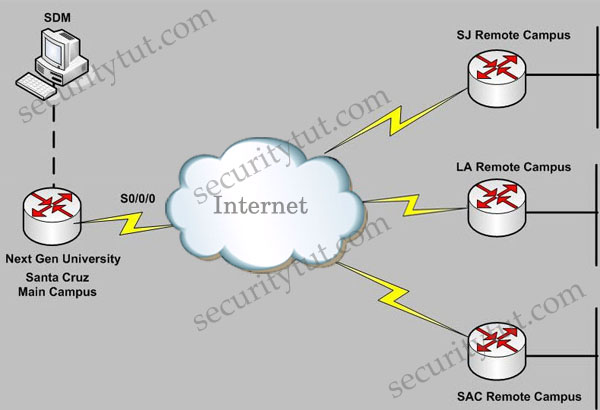
Next Gen University main campus is located in Santa Cruz. The University has recently established various remote campuses offering e-learning services. The University is using Ipsec VPN connectivity between its main and remote campuses San Jose(SJ), Los Angeles(LA), Sacremento(SAC). As a recent addition to the IT/Networking team, you have been tasked to document the Ipsec VPN configurations to the remote campuses using the Cisco Router and SDM utility. Using the SDM output from VPN Tasks under the Configure tab to answer this question.

Note:

Before reading the answers and explanations, you can try answering these 4 questions. Below are the screenshots that are necessary to answer all the questions.

Click on the Configure tab on the top menu and then click on the VPN tab on the left-side menu to see these tabs
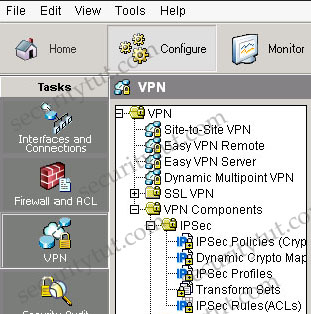
IPsec-SDM-Site-to-site-VPN-Configure_VPN.jpg

+ Tab VPN\Site-to-Site VPN (notice: you have to click on the “Edit Site to Site VPN” tab to see the image below
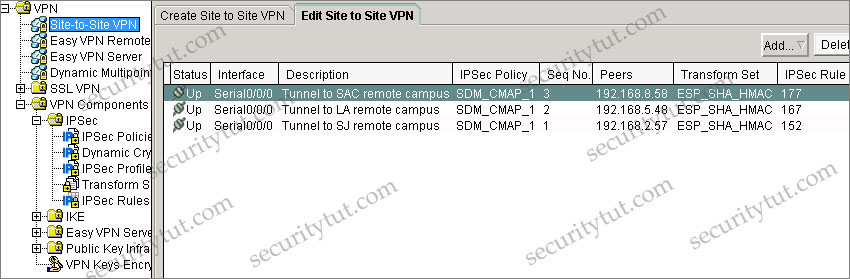
IPsec-site-to-site_TabSite_to_site_VPN_scales.jpg

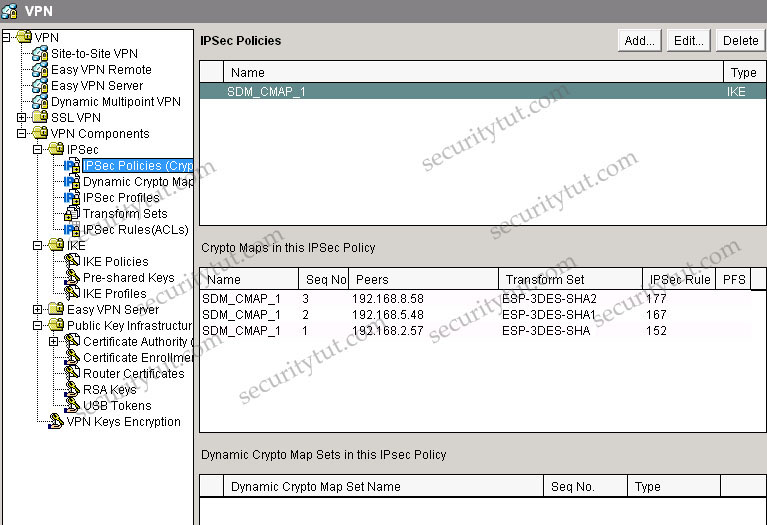
+ Tab VPN\VPN Components\IPSec\IPSec Policies

IPsec-SDM-Site-to-site-VPN-TabIPsec_Policies_scaled.jpg

+ Tab Dynamic Crypto is empty so there is no screenshot for this tab

+ Tab IPSec Profiles is empty so there is no screenshot for this tab

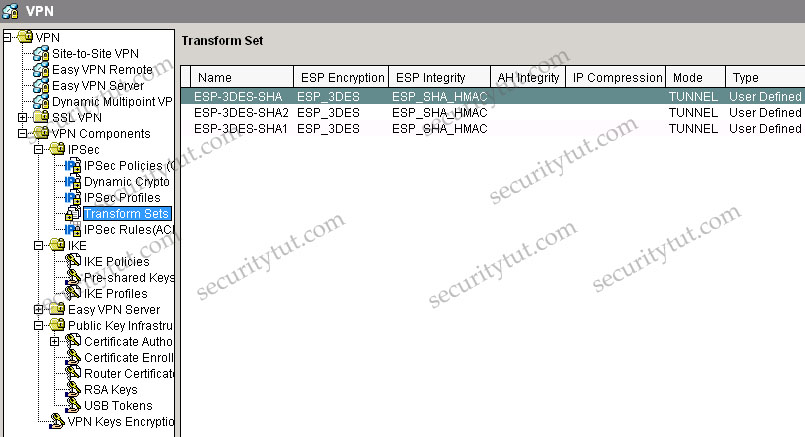
+ Tab VPN\VPN Components\IPSec\Transform Sets

IPsec-SDM-Site-to-site-VPN-TabTransform_Sets_scaled.jpg

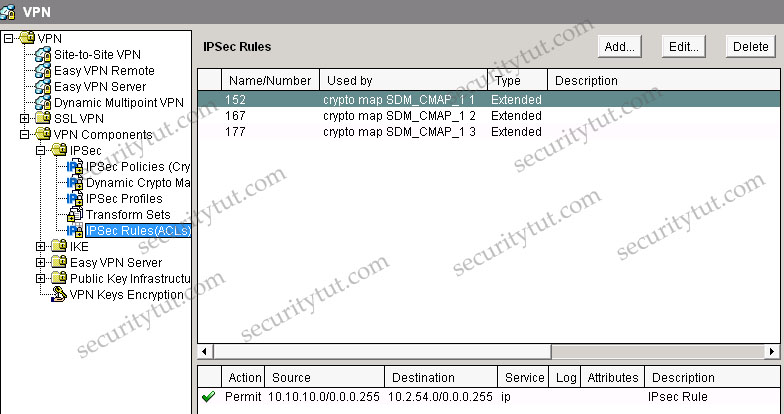
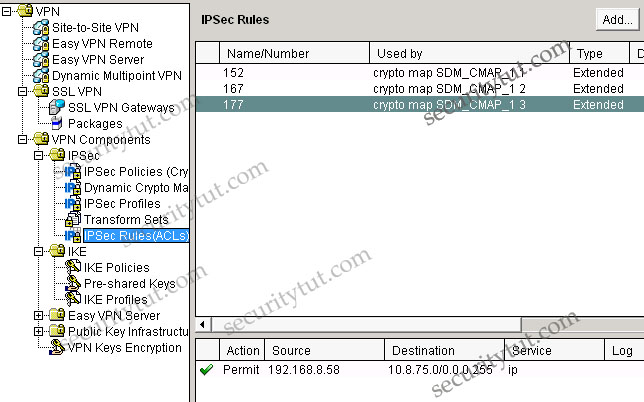
+ Tab VPN\VPN Components\IPSec\IPSec Rules

IPsec-SDM-Site-to-site-VPN-TabIPsec_Rules_scaled.jpg


IPsec-SDM-Site-to-site-VPN-TabIPsec_Rules_2_scaled_acl177.jpg

Question 1

Which one of these statements is correct in regards to Next Gen University Ipsec tunnel between its Santa Cruz main campus and its SJ remote campus?

A. It is using Ipsec tunnel mode, AES encryption, and SHA HMAC integrity Check.
B. It is using Ipsec transport mode, 3DES encryption, and SHA HMAC integrity Check.
C. It is using Ipsec tunnel mode to protect the traffic between the 10.10.10.0/24 and the 10.2.54.0/24 subnet.
D. It is using digital certificate to authenticate between the Ipsec peers and DH group 2.
E. It is using pre-shared key to authenticate between the Ipsec peers and DH group 5.

Answer: C

Explanation

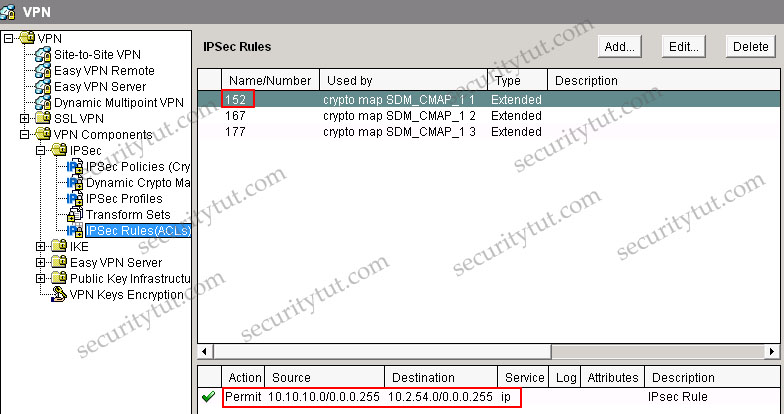
From the Site-to-site VPN tab, we specify that the SJ’s IP address is 192.168.2.57 with IPsec Rule of 152. Click on the IPSec Rules group to see what rule 152 is -> rule 152 is permit source 10.10.10.0/24 to destination 10.2.54.0/24.
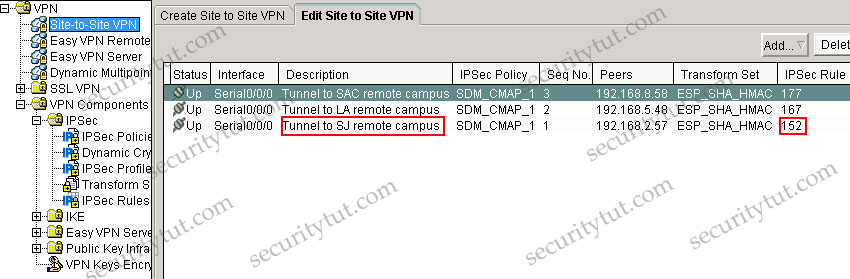
IPsec-site-to-site_TabSite_to_site_VPN_scales_answer.jpg

IPsec-SDM-Site-to-site-VPN-TabIPsec_Rules_scaled_answer.jpg

Also, in the description of the above tab, we can see “Tunnel to SJ remote campus” -> it uses Tunnel mode (although it is only the description and can be anything but we can believe it uses Tunnel mode). If you don’t want to accept this explanation then have a look at the IPSec Policy & Seq No. columns, which are SDM_CMAP_1 & 1. Click on the VPN Components\IPSec\IPSec Policies group we will learn the corresponding Transform Set is ESP-3DES-SHA. Then click on the Transform Sets group we can see the corresponding mode is TUNNEL.


Question 2

Which one of these statements is correct in regards to Next Gen University Ipsec tunnel between its Santa Cruz main campus and its SAC remote campus?

A. The SAC remote campus remote router is using dynamic IP address; therefore, the Santa Cruz router is using a dynamic crypto map.
B. Dead Peer Detection (DPD) is used to monitor the Ipsec tunnel, so if there is no traffic traversing between the two sites, the Ipsec tunnel will disconnect.
C. Tunnel mode is used; therefore, a GRE tunnel interface will be configured.
D. Only the ESP protocol is being used; AH is not being used.


Answer: D

Explanation

A is not correct because the VPN Components\IPSec\Dynamic Crypto Map group is empty -> the Santa Cruz router is not using a dynamic crypto map.

Not sure about answer B. We can find DPD information in the VPN Components\IKE\IKE Profiles group but I am not sure if this group exists in the exam.

C is not correct as we can use Tunnel mode without a GRE tunnel.

D is correct as we can see there is no AH configured under AH Integrity column in the VPN Components\IPSec\Transform Sets group (while in the ESP Integrity column it is ESP_SHA_HMAC).

Question 3

Which of these is used to define which traffic will be protected by IPsec between the Next Gen University Santa Cruz main campus and its SAC remote campus?

A. ACL 177
B. ACL 167
C. ACL 152
D. ESP-3DES-SHA1 transform set
E. ESP-3DES-SHA2 transform set
F. IKE Phase 1


Answer: A

Explanation

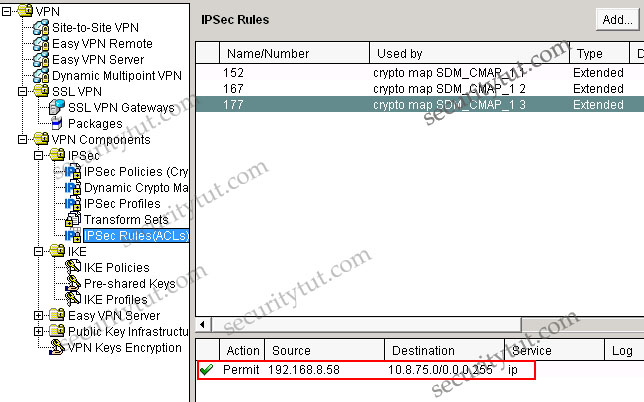
In the VPN\Site-to-site-VPN group we can easily see the SAC remote campus is protected by IPSec rule 177, which is an access-list

IPsec-site-to-site_TabSite_to_site_VPN_scales.jpg

Question 4

The Ipsec tunnel to the SAC remote campus terminates at which IP address, and what is the protected subnet behind the SAC remote campus router? (Choose two)

A. 192.168.2.57
B. 192.168.5.48
C. 192.168.8.58
D. 10.2.54.0/24
E. 10.5.66.0/24
F. 10.8.75.0/24


Answer: C F

Explanation
IPsec-SDM-Site-to-site-VPN-TabIPsec_Rules_2_scaled.jpg

Note:

Some terminologies you should know when configuring SDM

IPSec

A framework of open standards that provides data confidentiality, data integrity, and data authentication between participating peers. IPSec provides these security services at the IP layer. IPSec uses IKE to handle negotiation of protocols and algorithms based on local policy and to generate the encryption and authentication keys to be used by IPSec. IPSec can be used to protect one or more data flows between a pair of hosts, between a pair of security gateways, or between a security gateway and a host.

IPSec Policy

In SDM, an IPSec policy is a named set of crypto map associated with a VPN connection.

Internet Key Exchange (IKE)

Internet Key Exchange (IKE) is a standard method for arranging for secure, authenticated communications. IKE establishes session keys (and associated cryptographic and networking configuration) between two hosts across the network.

Cisco SDM lets you create IKE policies that will protect the identities of peers during authentication. Cisco SDM also lets you create pre-shared keys that peers exchange.

IKE Policies

IKE negotiations must be protected; therefore, each IKE negotiation begins by each peer agreeing on a common (shared) IKE policy. This policy states which security parameters will be used to protect subsequent IKE negotiations. This window shows the IKE policies configured on the router, and allows you to add, edit, or remove an IKE policy from the router’s configuration. If no IKE policies have been configured on the router, this window shows the default IKE policy.

After the two peers agree on a policy, the security parameters of the policy are identified by a security association established at each peer. These security associations apply to all subsequent IKE traffic during the negotiation.

Hash

The authentication algorithm for negotiation. There are two possible values:
+ Secure Hash Algorithm (SHA)
+ Message Digest 5 (MD5)

Authentication

The authentication method to be used.
+ Pre-SHARE: Authentication will be performed using pre-shared keys.
+ RSA_SIG: Authentication will be performed using digital signatures.

D-H Group

Diffie-Hellman (D-H) Group. Diffie-Hellman is a public-key cryptography protocol that allows two routers to establish a shared secret over an unsecure communications channel. The options are as follows:
+ group1 – 768-bit D-H Group. D-H Group 1.
+ group2 – 1024-bit D-H Group. D-H Group 2. This group provides more security than group 1, but requires more processing time.
+ group5 – 1536-bit D-H Group. D-H Group 5. This group provides more security than group 2, but requires more processing time.

AH

Authentication Header. This is an older IPSec protocol that is less important in most networks than ESP. AH provides authentication services but does not provide encryption services. It is provided to ensure compatibility with IPSec peers that do not support ESP, which provides both authentication and encryption.

AH-MD5-HMAC: Authentication Header with the MD5 (HMAC variant) hash algorithm.
AH-SHA-HMAC: Authentication Header with the SHA (HMAC variant) hash algorithm.

DES

Data Encryption Standard. Standard cryptographic algorithm developed and standardized by the U.S. National Institute of Standards and Technology (NIST). Uses a secret 56-bit encryption key. The DES algorithm is included in many encryption standards.

3DES

Triple DES. An encryption algorithm that uses three 56-bit DES encryption keys (effectively 168 bits) in quick succession. An alternative 3DES version uses just two 56-bit DES keys, but uses one of them twice, resulting effectively in a 112-bit key length. Legal for use only in the United States.

ESP

Encapsulating Security Payload. An IPSec protocol that provides both data integrity and confidentiality. Also known as Encapsulating Security Payload, ESP provides confidentiality, data origin authentication, replay-detection, connectionless integrity, partial sequence integrity, and limited traffic flow confidentiality.

+ ESP-MD5-HMAC: ESP (Encapsulating Security Payload) transform using the MD5-variant SHA authentication algorithm.
+ ESP-SHA-HMAC: ESP (Encapsulating Security Payload) transform using the HMAC-variant SHA authentication algorithm.

GRE

Generic routing encapsulation. Tunneling protocol developed by Cisco that can encapsulate a wide variety of protocol packet types inside IP tunnels, creating a virtual point-to-point link to Cisco routers at remote points over an IP internetwork. By connecting multiprotocol subnetworks in a single-protocol backbone environment, IP tunneling using GRE allows network expansion across a single-protocol backbone environment.

HMAC

Hash-based Message Authentication Code. HMAC is a mechanism for message authentication using cryptographic hash functions. HMAC can be used with any iterative cryptographic hash function, e.g., MD5, SHA-1, in combination with a secret shared key. The cryptographic strength of HMAC depends on the properties of the underlying hash function.

MD5

Message Digest 5. A one-way hashing function that produces a 128-bit hash. Both MD5 and Secure Hashing Algorithm (SHA) are variations on MD4 and are designed to strengthen the security of the MD4 hashing algorithm. Cisco uses hashes for authentication within the IPSec framework. MD5 verifies the integrity and authenticates the origin of a communication.

SHA

Some encryption systems use the Secure Hashing Algorithm to generate digital signatures, as an alternative to MD5.

ISAKMP

The Internet Security Association Key Management Protocol is the basis for IKE. ISAKMP authenticates communicating peers, creates and manages security associations, and defines key generation techniques.

Pre-shared Key

One of three authentication methods offered in IPSec, with the other two methods being RSA encrypted nonces, and RSA signatures. Pre-shared keys allow for one or more clients to use individual shared secrets to authenticate encrypted tunnels to a gateway using IKE. Pre-shared keys are commonly used in small networks of up to 10 clients. With pre-shared keys, there is no need to involve a CA for security.

Digital certification and wildcard pre-shared keys (which allow for one or more clients to use a shared secret to authenticate encrypted tunnels to a gateway) are alternatives to pre-shared keys. Both digital certification and wildcard pre-shared keys are more scalable than pre-shared keys.

Reference:

+ http://www.aboutcisco.biz/en/US/docs/routers/access/cisco_router_and_security_device_manager/25/software/user/guide/IKE.html

+ http://docstore.mik.ua/univercd/cc/td/doc/product/software/sdm/22ug/glossary.htm

Comments
Comment pages
1 2 526
  1. curious
    September 1st, 2010

    Is there any way to train with SDM? I have a 1710, but unfortunately not enough flash to run SDM.

    Thank you so much

  2. record
    September 1st, 2010

    curius you install SDM on your computer not in a CISCO flash router and you will run the SDM on your browser or icon of SDM , but this is the same.

  3. questionin
    September 2nd, 2010

    hi, i run a 3640 router in gns3 and connect winxp to the router. when i try to launch the site-to-site vpn by clicking the button on the sdm window, nothing happens. any idea?

  4. securitytut
    September 2nd, 2010

    @questionin: SDM is based on Java. You shouldn’t use lastest Java package as it makes some components in SDM inactive. You should use Java version from 6.0 to 6.10 (I used 6.0.1 and it worked well).

  5. curious
    September 2nd, 2010

    Record, thanks. I meant my router needs an IOS which supports SDM, but I do not have enough mem. For this IOS. (by the way, SDM does install some files in the flash of your router when you set it up, i.e. common.tar, sdm.tar etc.)

    But from questionin I can derive that you can run SDM on a ‘virtual router’ through gns and the likes.

  6. Ramki Shenai
    September 4th, 2010

    Works very well. My setup GNS3 0.72 + 3725 12.4 IOS. WinXP Home. Some tips

    1. Download and install Java JDK/JRE 1.6 update 3. Yes a very specific version indeed. Only with this was I able to get the Additional tasks working properly.
    http://java.sun.com/products/archive/j2se/6u3/index.html – For download
    Do this on you lap top

    Additional step if you want to work with IPS signatures
    Now go to Control Panel -> Java Console and set the run time properties of applet so that it allows for a 256MB stack.
    -Xmx256m (is what you fill in the data entry text box)

    2. Create a loop back adapter on laptop and assign it say an IP address 172.20.0.10/16

    3. In GNS run the router and attach a cloud to say f0/0. Configure f0/0 as 172.20.0.1/16.
    Attach cloud to loopback adapter.

    4. Download SDM 2.5 install package for PC. (here you are the mercy of google rapidshare sdm 2.5)
    When installing make sure you choose the option install only on PC.
    This will create a desktop icon for SDM 2.5

    5. Ready the router for basic SDM access
    a. Create user with privilege level 15
    R1(config)#user sdmuser privilege 15 secret sdmpass
    b. Enable http server and local auth
    R1(config)#ip http server
    R1(config)#ip http secure-server
    R1(config)#ip http authentication local
    c. Protect vty
    R1(config)#line vty 0 4
    R1(config-line)#transport input ssh

    6. Now double click on the laptop SDM icon. Enter the ip address for f0/0 and choose https access.
    a. Check router f0/0 interface is pingable from a cmd prompt box on the laptop. It should be reachable via the loopback you created and attached to the cloud in GNS
    b. On Internet Explorer 8.0 disable popup blocker and in advanced options enable “Allow active content from local file”.

    If you see ‘runXXXX.shtml’ instead of the SDM GUI then you did not enable the active content.

    Let me know if this works for you

  7. mightyman
    September 16th, 2010

    hi, anyone here got any cisco ios with firewall feature set? thanks!

  8. bobo
    September 27th, 2010

    took the test 10/24 the ACL listed as 177 on these and other sim samples was actually 174 on the test. All the answers were the same but there was no ACL 177

  9. mrmo
    September 28th, 2010

    Thank for the support

  10. Patrick
    October 8th, 2010

    The version of the SMD’s is in the tests, for a full version, or is the user other than in the real environment????

  11. questionin
    October 25th, 2010

    mightyman, i have one. i can email it to u!

  12. Axicos
    October 30th, 2010

    Had the exam on 29 Oct 2010. The Labs are valid. The only difference is the ACL numbers and the IPs. However not to worry as the instructions here are clear and you will be able to find the info in SDM easily as most other tabs are disabled or do not contain any info. So Cisco only shows you in SDM the relative information. Look and the answers are clear.

  13. Badey
    November 23rd, 2010

    could anyone update me; when was the last update for Cisco security exam(640-553).
    thanks

  14. Kevin
    November 27th, 2010

    Here is a config to match the Site-to-site VPN SDM Lab Sim. It was setup in GNS3 with a 3640 router. FastEthernet in the first slot and a 4t in the second slot. This is setup so SDM should be able to connect to it using the ip add 10.1.1.1 on the Fast0/0. Username is Security password of cisco.

    !
    version 12.4
    service timestamps debug datetime msec
    service timestamps log datetime msec
    no service password-encryption
    !
    hostname SC-Main-Campus
    !
    boot-start-marker
    boot-end-marker
    !
    logging buffered 4096 debugging
    !
    no aaa new-model
    memory-size iomem 5
    !
    !
    ip cef
    no ip domain lookup
    ip domain name mydomain.com
    !
    !
    !
    !
    !
    !
    !
    !
    !
    !
    !
    !
    !
    !
    !
    crypto pki trustpoint TP-self-signed-0
    enrollment selfsigned
    subject-name cn=IOS-Self-Signed-Certificate-0
    revocation-check none
    rsakeypair TP-self-signed-0
    !
    !
    crypto pki certificate chain TP-self-signed-0
    certificate self-signed 01
    quit
    username Security privilege 15 secret 5 ciscocisco
    !
    !
    !
    !
    crypto isakmp policy 1
    encr 3des
    authentication pre-share
    group 2
    !
    crypto isakmp policy 2
    encr 3des
    authentication pre-share
    group 2
    !
    crypto isakmp policy 3
    encr 3des
    authentication pre-share
    group 2
    crypto isakmp key ciscovpn address 192.168.8.58
    crypto isakmp key ciscovpn address 192.168.5.48
    crypto isakmp key ciscovpn address 192.168.2.57
    !
    !
    crypto ipsec transform-set ESP-3DES-SHA esp-3des esp-sha-hmac
    crypto ipsec transform-set ESP-3DES-SHA2 esp-3des esp-sha-hmac
    crypto ipsec transform-set ESP-3DES-SHA1 esp-3des esp-sha-hmac
    !
    crypto map SDM_CMAP_1 1 ipsec-isakmp
    ! Incomplete
    description Tunnel to SJ remote campus
    set peer 192.168.2.57
    set transform-set ESP-3DES-SHA
    match address 152
    crypto map SDM_CMAP_1 2 ipsec-isakmp
    description Tunnel to LA remote campus
    set peer 192.168.5.48
    set transform-set ESP-3DES-SHA1
    match address 167
    crypto map SDM_CMAP_1 3 ipsec-isakmp
    description Tunnel to SAC remote campus
    set peer 192.168.8.58
    set transform-set ESP-3DES-SHA2
    match address 177
    !
    !
    !
    !
    interface Loopback0
    ip address 10.10.10.1 255.255.255.0
    !
    interface FastEthernet1/0
    ip address 10.1.1.1 255.255.255.0
    duplex auto
    speed auto
    no shut
    !
    interface Serial0/0
    ip address 192.168.8.57 255.255.0.0
    encapsulation frame-relay
    serial restart-delay 0
    no fair-queue
    frame-relay interface-dlci 101
    frame-relay interface-dlci 102
    frame-relay interface-dlci 103
    crypto map SDM_CMAP_1
    no shut
    !
    interface Serial0/1
    no ip address
    shutdown
    serial restart-delay 0
    !
    interface Serial0/2
    no ip address
    shutdown
    serial restart-delay 0
    !
    interface Serial0/3
    no ip address
    shutdown
    serial restart-delay 0
    !
    router eigrp 10
    redistribute connected
    network 192.168.0.0 0.0.255.255
    no auto-summary
    !
    ip http server
    ip http authentication local
    ip http secure-server
    ip http timeout-policy idle 60 life 86400 requests 10000
    !
    !
    !
    access-list 152 remark IPsec Rule
    access-list 152 permit ip 10.10.10.0 0.0.0.255 10.2.54.0 0.0.0.255
    access-list 167 remark IPsec Rule
    access-list 167 permit ip 10.10.10.0 0.0.0.255 10.8.75.0 0.0.0.255
    access-list 177 remark IPsec Rule
    access-list 177 permit ip host 192.168.8.58 10.2.54.0 0.0.0.255
    !
    !
    !
    control-plane
    !
    !
    !
    !
    !
    !
    !
    !
    !
    !
    line con 0
    exec-timeout 0 0
    logging synchronous
    login local
    line aux 0
    line vty 0 4
    privilege level 15
    logging synchronous
    login local
    transport input telnet ssh
    line vty 5 15
    privilege level 15
    login local
    transport input telnet ssh
    !
    !
    end

  15. Kevin
    November 27th, 2010

    Correction: the fast0/0 and 4t are switched. the 4t is in the first slot and the 4t is in the second slot.

  16. Kevin
    November 27th, 2010

    Fast0/0 is in the second slot

  17. Chris
    November 28th, 2010

    Thanks for the config Kevin, its a real help, almost worked on my 3620 router, had to change a few minor things but overall good, =]

  18. joe
    December 4th, 2010

    Hi friends & 9tut

    kindly provide me the dumps for security
    which book is good for reff

    pls pls

    thanks in advance

  19. Shervin
    December 16th, 2010

    I am schedule to take this exam tomorrow, does anyone know how many Lab Sim will be listed on the exam at the same time?

  20. uk-based
    December 22nd, 2010

    Brilliant website. Really well laid out and great help. Thanks so much and keep up the great work.

  21. sec
    January 24th, 2011

    What is a good book for Implementing Cisco IOS Network Security(CCNA Security 640-553)

  22. Timoz
    January 25th, 2011

    Hi SecurityTut

    I just passed the exam , thanx all securitytut.
    my advice for you all to check da answers for drag and drop espicialy IKE 1 & 2 be ware of the following questions

    130/137 is wrong , same question 56/137 is the correct one

    and

    133/137 is wrong , same question 89/137 about attack mitigation is the correct one

    i mean the answers wrong , u can exchange it by that i mentioned
    thats all i observed , for any assistant u can ask me
    ahmd_noraldeen@yahoo.com

    thanks alot again , best wishes 4 all

  23. pdeji
    January 31st, 2011

    @ sec get yourself, ccna security exam cram.

    @ Timon, I can’t figure out the questions u mentioned on this page can u give directory or links.

    thanks.

  24. sec
    February 3rd, 2011

    can someone explain to me how to connect to the loopback interface from gns3.

  25. Carolann Cowie
    February 11th, 2011

    yay google is my king assisted me to find this great web site ! .

  26. Andrew Joseph
    February 12th, 2011

    Just desired to say that you’ve some awesome content on your weblog. If it’s OK I wants to use some with the information you provided on my web site. If I link back again to your website would it be OK to do so?

  27. purpleturtle
    February 15th, 2011

    @sec
    drag a cloud into the work space
    right click the cloud and click configue
    use the drop down arrow to get to your loop back
    click apply

  28. ivartyn
    February 16th, 2011
  29. teste de qi
    February 17th, 2011

    “Embora nos viajamos o mundo todo para encontrar o belo, devemos carrega-la conosco ou nos nao encontramos isso.” ~ Ralph Waldo Emerson

  30. pdeji
    February 17th, 2011

    I have my exams on 28th of this month……i see a lot of sdm on pass4sure are they all relevant. i will still revise them anyway…..

  31. ciculeseo
    February 20th, 2011

    thanks for this nice post 111213

  32. kiciluseO
    February 23rd, 2011

    thanks for this tips

  33. Ladak
    March 17th, 2011

    In CCNA Security exam, is there any LAB to design VPN on routers???
    Please confirm
    Thanks
    Ladak

  34. saj
    March 24th, 2011

    me writing ccna security this week pls giv me the latest dumps…

    thanks

  35. Adnan
    April 28th, 2011

    @ securitytut and all
    Please guide about study material other than dumps… I want to take this exam…Any useful book and simulater ????

    Regards

  36. Jairo Brazil CCNA Security
    April 28th, 2011

    I have VCE software to open more than 5 questions to open the Cisco.TestInside.640-553.v2010-08-27.by.noname.137q.vce and also I hava the sims to pratice on the Packet Tracer

    If u need any asistence, drop an e-mail on my mail box

    jairodeaguiar@hotmail.com

    or facebook.com/jairodeaguiar

    stating that it is abt CCNA Security

    Good luck for all

  37. Maiquel
    May 9th, 2011

    Kevin thanks, the example work for me…
    :-)

  38. Afridi
    May 23rd, 2011

    @ Security, All
    can anyone tell me wt is the exam fee

  39. Waleed
    May 26th, 2011

    I am going to have my CCNA Security (640-553) exam on 3rd June 2011….Please anyone tel me that 138Qs(pass4sure ver 4.38) are still valid????please help me out.

  40. Waleed
    May 27th, 2011

    @Afridi – Exam fee is $250 equivalent to 22,000 PKR.

  41. RixguexSice
    May 29th, 2011
  42. gio
    June 2nd, 2011

    hey guys i need to know how many labs appear on exam?, and also is out there a simulator of the SDM?

    thanks in advance

  43. sofiane
    June 4th, 2011

    hello, plz can any one help me to launh sdm, it s already installed on my pc bout i dont know what to put when a box opens and asks me for ip addess or hostname; very grateful

  44. Ratan Bhattacharya
    June 4th, 2011

    can someone explain to me how to connect to the loopback interface from gns3?

  45. Rohann
    June 4th, 2011

    Hi All,

    I have given exam and passed with 1000/1000. Studied as follows-
    1. Simlets and lab – used securitytut (100 % valid)
    2. Questions- Testinside Ver 6.12 (Q.137)
    3. CISCO Official certification guide,CCNA Security Authorized Self-Study Guid
    Passing score – 804/1000
    Time- 120 mins (India)

  46. JKano@cisco.com
    June 6th, 2011

    @sofiane,

    The ip address is the default gateway ip address as you configured in your pc to excess the external network.

    Hostname is the name of the router which you are connected to with your pc where you want to configure the router with sdm.

    For username name and password is the vty configuration using privilege 15. for example

    Router(config)#username sofiane privilege 15 secret 0 sofianepassword

    The username is sofiane
    The password is sofianepassword

    Goodluck

  47. JKano@cisco.com
    June 6th, 2011

    @Ratan Bhattacharya,

    You configure the loopback interface just the way you configure other interfaces, for example fastethernet 0/1, serial 0/0/0

    Router(configure)#interface loopback 0
    Router(configure-if)#ip address 10.1.1.1
    Router(configure-if)#no shutdown
    Router(configure-if)#exit
    Router(configure)#exit
    Router#

    NOTE: you have to specify loopback interface number you want to configure, for example loopback 0
    loopback 1
    loopback 2

    and so on and so forth

    Goodluck

  48. M4molano
    June 8th, 2011

    @ALL

    Hi everyone,

    COULD ANYBODY TELL US PLEASE WHERE WE CAN DOWNLOAD THE Testinside Ver 6.12 (Q.137) ??? Rohann has mentioned it does anybody already got it?

    please share it with us share the link!

    thanks in advance

  49. Rohann
    June 10th, 2011

    Hi All,
    you may read pass4sure 4.38 also. but then you have to master on lab and sims
    Ver 6.11(Q.133) is also valid.
    still I will prefer to go through QnA/ Topics
    from official cert guide from Cisco

  50. M4molano
    June 11th, 2011

    @everybody

    does anybody know if the sim labs post on this page are enought or there are more possible labs?

  51. MOH
    June 15th, 2011

    Guys i just wrote this exam today and passed with a total score of 988/1000
    Thanx to u all and God bless u.

  52. walter
    June 19th, 2011

    do anyone have CBT nugget video for the ccna security?.. thanks

  53. delete
    June 19th, 2011

    does the question on this site the same as real exams concerning this sim?

  54. tokenizer_mhoyy_2x
    June 21st, 2011

    @9tut

    is there ccnpsecurity forum here

  55. Alex
    June 22nd, 2011

    I have installed GNS3 0.72 + 3725 12.4 (23). WinXP
    . Create a loop back adapter on laptop and assign it say an IP address 172.20.0.10/16

    3. In GNS run the router and attach a cloud to say f0/0. Configure f0/0 as 172.20.0.1/16.
    Attach cloud to loopback adapter.

    I have Downloaded SDM 2.5 install package for PC.
    I installed SDM 2.5 install only on PC.
    This will create a desktop icon for SDM 2.5

    5. Ready the router for basic SDM access
    a. Create user with privilege level 15
    R1(config)#user sdmuser privilege 15 secret sdmpass
    b. Enable http server and local auth
    R1(config)#ip http server
    R1(config)#ip http secure-server
    R1(config)#ip http authentication local
    c. Protect vty
    R1(config)#line vty 0 4
    R1(config-line)#transport input ssh
    I double clicked on the laptop SDM icon. Enter the ip address for f0/0 and choose https access a message came up:Loading cisco SDM.Please wait the arrow glad keeps moving around for more 40 it nothing was display , i am wonding what steps did i miss or whats wrong.I have broswer I.E6.0.I am using Java ver 6 Please needs help.Thanks in advance

  56. delete
    June 23rd, 2011

    inmate is noname still current? and any update on CCNA security dump

  57. Alex
    June 25th, 2011

    question:how many questions on the real ccna security exam ?

  58. Anonymous
    July 5th, 2011

    Alex i think you need an update IE but i am starting this process this week. i just watch a video on UTUBE and i think you should go there too. it would help you . questions should be about 50-60

  59. Alex
    July 7th, 2011

    @Anonymous thank you

  60. mulahFummance
    July 11th, 2011

    Of man who got real and continued pleasure out of instruction.

  61. Mr M
    July 18th, 2011

    hey guys Ti6.11(Q.133) is still valid?

  62. Network Junky
    July 20th, 2011

    Taking CCNA security test on the 28TH .Any Advice anyone.

  63. Neo TEo
    July 21st, 2011

    @Network Junky

    hey don’t forget to post feedback once you pass it good luck!!

  64. Oke
    August 16th, 2011

    I will need study materials for CCNA Security, i will appreciate your kind assistance.

    OKe

  65. Happyman
    August 17th, 2011

    hey everybody!!

    i passed today 1000/1000 ti v.11 is still valid also the simlabs posted on this page.
    thanks to all of you!!!

  66. Wow!!
    August 19th, 2011

    Passed today with 1000/1000 I used TK V4.5 Testing Eng 3.0.30 and this site for the sims. Keep in mind that the sims on this page will show you how to do them, not all the IP’s and ACL are the same on the exam, but if you understand how to find the info you shouldn’t have a problem on the exam!

  67. Samantha
    August 28th, 2011

    hi,

    Thank you very much for your help securitytut.com, and certkingdom.com for providing me complete training for my cisco exam, with amazing Testing Engine and other training tools
    keep it guys.

    Thanks again

  68. xomka686
    September 8th, 2011

    Can anyone provide me TK V4.5 Testing Eng 3.0.30, please. xomka686@gmail.com

  69. Basma
    September 13th, 2011

    can any body send me TK V4.5 Testing Eng 3.0.30 ASAP mocha.passion@yahoo.com
    Thanks Guys

  70. samsung 1080p hdtv
    September 19th, 2011

    Awesome article, I am regular visitor of this website, keep up the good work, and I will be a regular visitor for a very long time.

  71. coupons online
    September 20th, 2011

    I can truly say that I have never read so much useful information about CCNA Security » Site-to-site VPN SDM Lab Sim. I want to express my gratitude to the webmaster of this blog.

  72. Reno
    September 30th, 2011

    How can I get SDM to play in a sim? can i do this with GNS3?

  73. CDub
    October 5th, 2011

    @Reno
    Yes you can play w/ SDM in GNS3. you just have to make sure you have correct java version.

  74. KP
    October 20th, 2011

    Just passed 640-553 with a score mark of 940. This is still very valid: Cisco.CertKey.640-553.v2011-08-15.by.Spike.165q.vce. You can find it at Certcollection or Careercert. Thanks for all your help. Goodluck to you all.

  75. Tendai1984
    October 26th, 2011

    Guys, anyone with latest CCNA SECURITY DUMPS

  76. piyush
    November 9th, 2011

    @KP could u please forward me the dump. it will be very kind of u. cyperxprt@gmail.com

  77. Rao
    November 10th, 2011

    @Kp, Could you please forward me the CCNA Security dumps . mvrao.mtech@gmail.com. (Thank you in adavance)

  78. bULL
    November 11th, 2011

    @ALL

    Does the question and answer remain same as in this site or they can chnage the options like encryption etc

  79. Craig
    November 13th, 2011

    very interesting information! .

  80. Sean Flores
    November 14th, 2011

    Hah, Italy protesters rally against Berlusconi

  81. abhi
    November 17th, 2011

    @Bull,

    The strategy will be the same but the reply may vary . And drag and drop some time May come as MCQ. Please see to it . I got 988 on tuesday . please dont use any dump.CCNA security official cert guide+ securitytut.com = 988 or 1000 for sure.

    @Securitytut.com

    Thank you very much for your help.

  82. Angelina Urso
    November 17th, 2011

    Any news about A defector’s unexplainable disappearance?

  83. Attila
    November 18th, 2011

    I’m keep trying to configure the SDM on GNS3 for a week but I have the same result, when the sdm starts loading it shows “Please wait while sdm is loading the current configuration from your router. Discovering router hardware attributes.”
    So now I’m looking for somebody who could help me to set up a virtual lab on mine or for remote login for some paypal donation.
    Please contact me if you have some free time for some money, contact me on keleny@gmail.com
    Thanks,
    Attila

  84. Attila
    November 18th, 2011

    the email was wrong kelenyi@gmail.com

  85. promo codes
    November 20th, 2011

    I am impressed to read such a powerful story about CCNA Security » Site-to-site VPN SDM Lab Sim. I will post a link on my coupon site to this blog post. I will be back to read more.

  86. Passed 955
    November 22nd, 2011

    Thanks to 9tut! Installing the sdm with gns3 was a HUGE help in fact its a must to pass if you do not have access to a isr router. The reason being is becuase they change the number of the acl’s. I would say its essential to know your way around the SDM to pass. Great site guys could not done it without you!! Kevins config was another great contributing factor as well.

  87. bULL
    November 26th, 2011

    hi ALL

    what does this mean as said by timoz

    130/137 is wrong , same question 56/137 is the correct one

    and

    133/137 is wrong , same question 89/137 about attack mitigation is the correct one

  88. Teslagurl
    December 14th, 2011

    hi all,
    Thank you very much for your input. I just passed ccna security with 1000 marks.

    Few changes to Zone question – name of the locations changed and ip addresses. Questions were mostly same.

    thumbs up to all here!

  89. Teslagurl
    December 14th, 2011

    Also command show port-security interface 0/12 helped me double check my answer on the SIM

  90. Anonymous
    January 11th, 2012

    @Teslagurl or anybody, can you send me the latest dumb please ? pappie_kay@yahoo.co.uk

  91. Gohar
    January 31st, 2012

    Hi guys, Can anyone guide me how to use SDM with simulators. Thanks

  92. CCNA sec_1
    January 31st, 2012

    Can anyone guide me on how to install SDM using GNS3 on Windows XP to practice?

  93. Juno
    February 2nd, 2012

    @Kevin@ or anyone that could help me with understanding what Kevin has done.All is fine but:

    1) I didn’t understand IP addressing,192.168.8.58 in particular

    crypto map SDM_CMAP_1 3 ipsec-isakmp
    description Tunnel to SAC remote campus
    set peer 192.168.8.58 (that is the peer/Internet facing IP for SAC? if so why this IP address is a part of the interesting traffic for VPN ???)
    match address 177

    access-list 177 remark IPsec Rule
    access-list 177 permit ip host 192.168.8.58(it should be 10.10.10.0/24) 10.2.54.0 0.0.0.255

    2)you have specified 2 exactly the same network behind SJ and SAC(refer to your ACL)

    access-list 152 remark IPsec Rule
    access-list 152 permit ip 10.10.10.0 0.0.0.255 10.2.54.0 0.0.0.255
    !
    access-list 177 remark IPsec Rule
    access-list 177 permit ip host 192.168.8.58 10.2.54.0 0.0.0.255

    Your VPN will not work if it can see 2 same destinations ( 10.2.54.0/24)

  94. Juno
    February 2nd, 2012

    Question 4 is wrong if you believe @Kevin@ (refer to ACL config)

    crypto map SDM_CMAP_1 2 ipsec-isakmp
    description Tunnel to LA remote campus
    set peer 192.168.5.48
    set transform-set ESP-3DES-SHA1
    match address 167
    access-list 167 remark IPsec Rule
    access-list 167 permit ip 10.10.10.0 0.0.0.255 10.8.75.0 0.0.0.255
    he is saying that 10.8.75.0 i behind LA Remote campus BUT question 4 says that the same subnet is behind SAC Remote Campus.

    Which one should we trust ?

  95. gept65
    February 6th, 2012

    When taking the test for the simulation areas, does the SDM simulator automatically comes up after “clicking” at the PC/Console icon? Or, after clicking at the PC/Console icon am I required to enter the commands that energize the SDM simulator?
    Please help.
    Thanks,
    George

  96. Alcoscotses
    February 8th, 2012

    Can you image that there is a good place which you can buy anything you want with a low price.

  97. Dev
    February 9th, 2012

    Appearing exam on 13th feb 2012..which dumps to follow?? Please Help me out guys…..

  98. rv123
    February 9th, 2012

    Which dumps to follow??

  99. G-Man
    February 9th, 2012

    I studied using this site and was able to pass the test this week. Follow instructions on how to navigate through the SDM the way is explained in this web page, and you will be ok.

  100. rv123
    February 10th, 2012

    Thanks G-Man

Comment pages
1 2 526
  1. No trackbacks yet.
Add a Comment